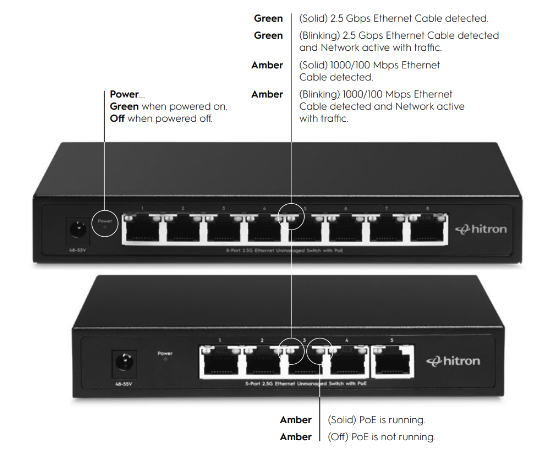
What do the LED Colors on the APEX2105 mean during Troubleshooting?
Answer:
- Green (Solid): 2.5 Gbps Ethernet connection detected
- Green (Blinking): 2.5 Gbps connection with active traffic
- Amber (Solid): 1000 / 100 Mbps Ethernet connection detected
- Amber (Blinking): 1000 / 100 Mbps connection with active traffic
- No Light: No Ethernet connection detected
No light usually indicates a cable or device issue.

Need More Help?
If you need additional assistance, our Technical Support Team is available 7 days a week, from 6:00 AM to 8:00 PM PT. Visit https://us.hitrontech.com/contact-support/ to chat live with a support agent and get immediate help with your Hitron device.